
Carlos Delgado
How to A/B Test WhatsApp Messages and Improve Conversion With Every Campaign
Most businesses send WhatsApp campaigns based on gut feeling. They write one template, send it to the whole list, and hope. A/B testing replaces hope with data. By splitting your audience and sending two versions of the same message, you learn what actually drives replies, clicks, and conversions, and every campaign after that gets better.
The challenge is that WhatsApp doesn't have a built-in A/B testing feature like email platforms do. You have to set it up yourself, or use a platform that handles the split for you. This guide covers how to do it properly.
Quick Answer
To A/B test WhatsApp messages, create two versions of a message template that differ in one variable (headline, CTA, body copy, or media). Split your audience randomly into two equal groups using your WhatsApp Business API platform. Send Version A to one group and Version B to the other. Measure the results — reply rate, click-through rate, or conversion rate — after 24–48 hours. The version that performs better becomes your default, and you test the next variable. Repeat for every campaign.
What to Test
The power of A/B testing comes from isolating one variable at a time. Change too many things between versions and you won't know which difference drove the result. Start with the elements that have the biggest impact on performance.
Variable | Version A Example | Version B Example | What It Reveals |
|---|---|---|---|
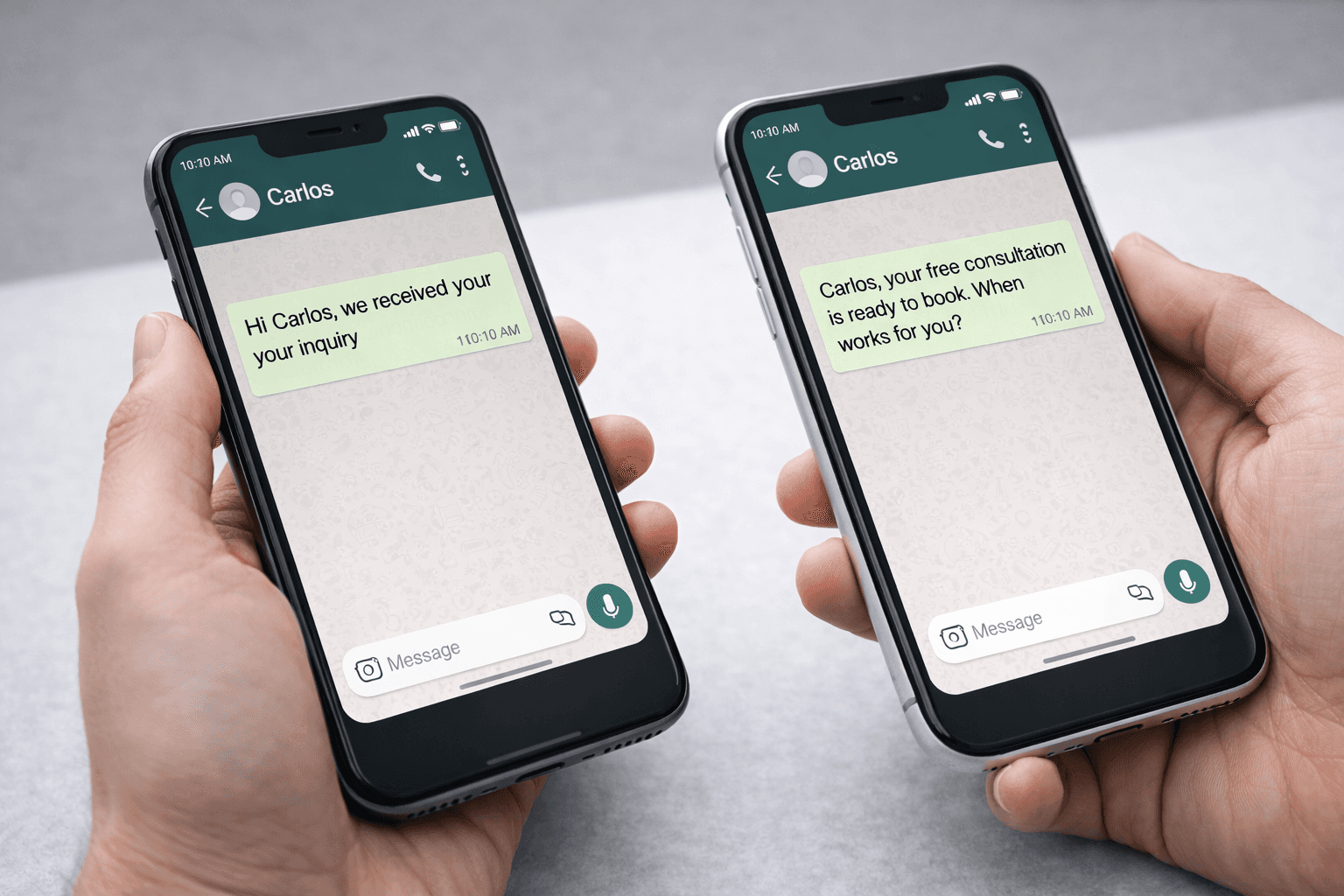
Opening Line | "Hi {{name}}, we received your inquiry" | "{{name}}, your free consultation is ready to book, when works for you?" | Which tone drives higher open-to-reply rates |
CTA Style | Button: "Book a Demo" | Button: "See How It Works" | Which action language generates more clicks |
Message Length | more than 134 characters + 1 button | 134 characters or less + 1 button | Whether brevity beats detail for your audience |
Media Type | Text-only template | Template with product image | Whether visuals increase engagement or clutter |
Send Time | Tuesday 10am | Thursday 2pm | When your audience is most responsive |
How to Run the Test (6 Steps)
Pick one variable: Choose a single element to test. If you're just starting, begin with the opening line or CTA, these have the most direct effect on response rates. Don't change anything else between the two versions.
Create two approved templates: Submit both template versions to Meta for approval. Each template needs its own approval since even small wording changes create a new template.
Split your audience randomly: Divide your target segment into two equal, randomly assigned groups. The split must be random to avoid skewing results. Most WhatsApp platforms support percentage-based audience splits.
Send simultaneously: Deliver both versions at the same time, on the same day. If you send Version A in the morning and Version B in the afternoon, you're testing timing, not messaging. Same time, same day, same audience profile.
Wait 24–48 hours: WhatsApp messages get read fast, most within the first hour, but conversions (booking a call, making a purchase) can lag. Give the test at least 24 hours before drawing conclusions. For campaigns with longer sales cycles, wait 48 hours.
Measure and apply: Compare the key metric for each version: reply rate for conversational messages, click-through rate for CTA-driven campaigns, or conversion rate for sales-oriented templates. The winner becomes your default. Then test the next variable.
Which Metrics to Track
Read Rate
What percentage of delivered messages were opened. WhatsApp read rates are high across the board, so differences here tend to be small, but a consistent gap signals that your opening line is doing the work.
Response Rate
This is usually the primary metric. What percentage of recipients replied to the message or tapped the CTA button. This tells you whether the message earned engagement, the most actionable signal on WhatsApp.
Conversion Rate
What percentage of recipients took the final desired action: booked a demo, completed a purchase, filled a form. This is the metric that ties back to revenue so track it with CRM event logging.
Sample Size and Statistical Significance
An A/B test only means something if your sample is large enough. Sending Version A to 30 people and Version B to 30 people won't produce reliable results, the numbers are too small for the difference to be meaningful. As a practical rule, aim for at least 500 recipients per variant for CTA-based tests, and at least 200 per variant for reply-rate tests (since reply rates on WhatsApp tend to be higher than email click rates, smaller samples can still show clear trends).
If your list is smaller than this, run the same test across multiple campaigns and aggregate the results.
Common Mistakes
Testing too many variables at once
If you change the headline, CTA, and image simultaneously, a winning result tells you nothing about which change mattered. Isolate one variable per test.
Non-random audience splits
Splitting by signup date or location introduces bias. Group A might perform better because of who they are, not because of the message. Always randomise.
Declaring a winner too early
A 2% difference after 50 deliveries is noise, not signal. Wait for enough volume and time before deciding. If the difference is under 3–5% with a small sample, the result is inconclusive.
Never testing again
One test doesn't optimise a channel. The best WhatsApp teams run a test with every campaign, each one compounds a small improvement into significantly better performance over time.
Ignoring downstream metrics
A higher reply rate doesn't always mean a better outcome. If Version A gets more replies but Version B generates more booked demos, Version B wins. Always connect the test to a business result.
A/B testing on WhatsApp is straightforward once you build the habit. One variable, two templates, a random split, and a clear metric. Do it with every campaign and your messaging improves automatically, each test removes a guess and replaces it with evidence.






