
Carlos Delgado
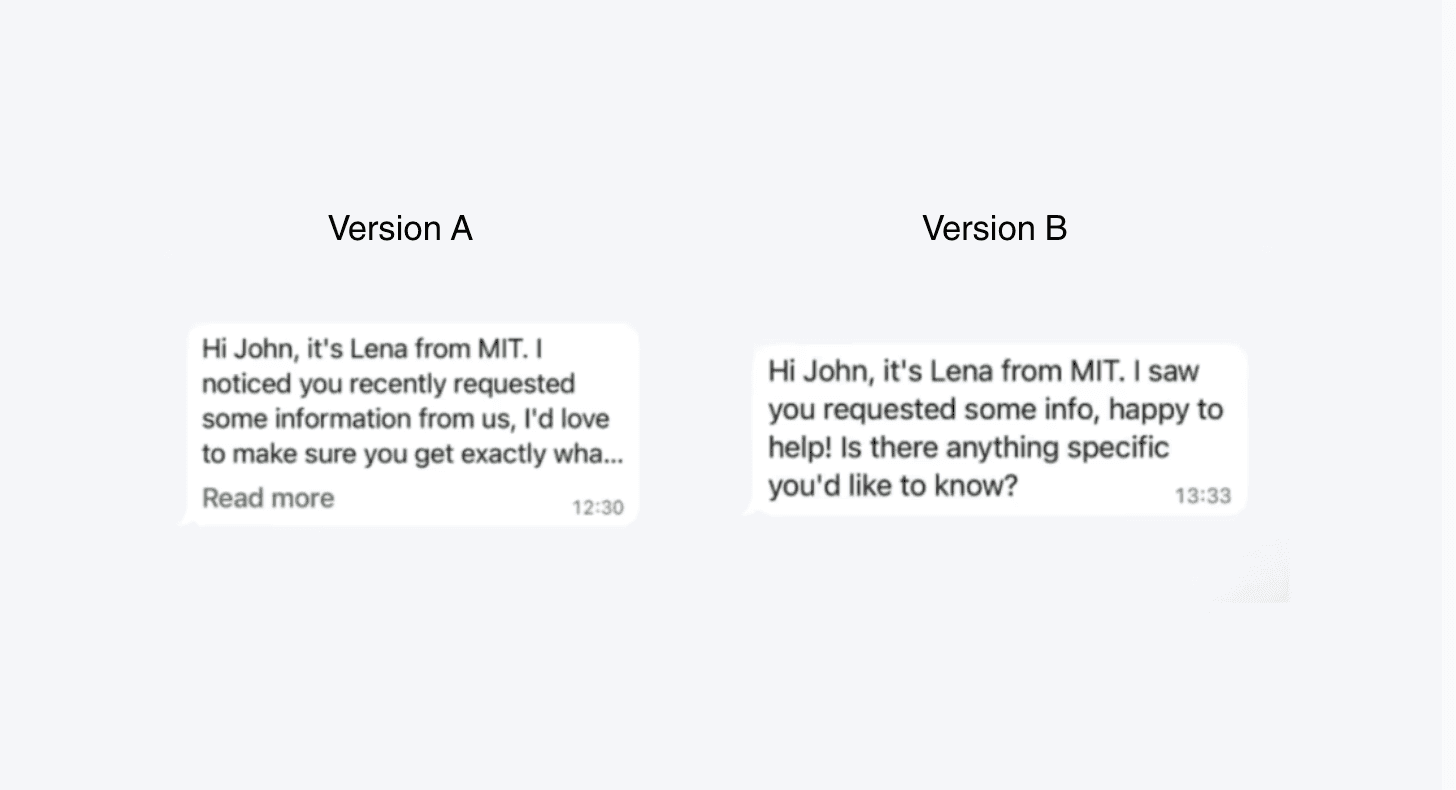
How Long Should a WhatsApp Outreach Message Be? The Data Says Under 134 Characters
The ideal WhatsApp outreach template is under 134 characters. Messages longer than this are cut off on mobile with a "Read more" prompt, and that single UI detail can cost you 13 percentage points in reply rate.
What Is the WhatsApp Character Limit for Outreach Templates?
WhatsApp displays approximately 134 characters before truncating a message on mobile with a "Read more" link. For sales and outreach messages, anything beyond that threshold risks being ignored, because most leads never tap to expand. This isn't just a formatting quirk. It's a conversion issue.
The Data: Short vs. Long WhatsApp Templates
An A/B test run across 8,283 WhatsApp conversations compared two initial outreach templates from the same sender:
Template | Length | Response Rate |
|---|---|---|
Long template | 195 characters | 49% |
Short template | 121 characters | 62% |
Result: The shorter message drove a 13 percentage point higher response rate, a 26% relative improvement, with no other variables changed. The only difference was length.
Why Does Message Length Affect WhatsApp Reply Rates?
The "Read More" Prompt Signals a Campaign
When a WhatsApp message is truncated, leads must actively tap to see the full content. That extra step, however small, creates friction. More importantly, it signals automation. A message that requires expansion feels like a mass blast. A message that fits in the preview feels like a text from a real person.
First Impressions Are Made in Milliseconds
On mobile, leads scan messages before deciding whether to respond. A short message that reads like a genuine human text passes that scan instantly. A long message that gets cut off raises a question before you've had a chance to make your ask.
Brevity Signals Respect
Short messages communicate that you value the recipient's time. Long messages, especially in a personal channel like WhatsApp, can feel demanding or impersonal.
How to Write a High-Converting WhatsApp Outreach Template
To keep your initial WhatsApp message under 134 characters while maximizing reply rate:
1. Lead with a single, specific question: Give the recipient one easy thing to respond to. Avoid multiple asks in a first message.
2. Ditch the intro: You don't need "Hi, I'm [name] from [company]..." before your opener. Jump straight to value or curiosity.
3. Remove filler phrases: Words like "I wanted to reach out because..." or "I hope this message finds you well" add characters without adding value.
4. Test your message on mobile before sending at scale: What looks fine on desktop may truncate on a phone. Always preview your template on a real device.
5. Save context for the follow-up: Your first message doesn't need to explain everything. Its only job is to get a reply.
Frequently Asked Questions
What is the ideal WhatsApp template length for outreach?
Under 134 characters. Messages beyond this length are truncated on mobile and require the recipient to tap "Read more," which reduces reply rates.
How much does message length affect WhatsApp response rates?
Based on an 8,283-conversation A/B test, a 121-character message achieved a 62% response rate vs. 49% for a 195-character message, a 13 percentage point difference.
Does a shorter WhatsApp message really feel more human?
Yes. When a message fits in the preview without truncation, it reads like a personal text rather than a campaign. That perception significantly improves the likelihood of a response.
What happens when a WhatsApp message is over 134 characters?
WhatsApp displays a "Read more" prompt, which adds a step for the recipient and signals that the message may be automated or templated, both of which reduce engagement.
Key Takeaway
On WhatsApp, less is more and the data proves it. If your initial outreach template is over 134 characters, it's not just long. It's hurting your reply rate.
Keep your first message short enough to feel human, specific enough to earn a response, and brief enough to fit in the preview. Everything else can wait for the conversation that follows.






